
Merge Databases
If you have passwords spread across multiple databases, you can consolidate them by moving cards from one database to another. No export files needed.
How to merge on Android
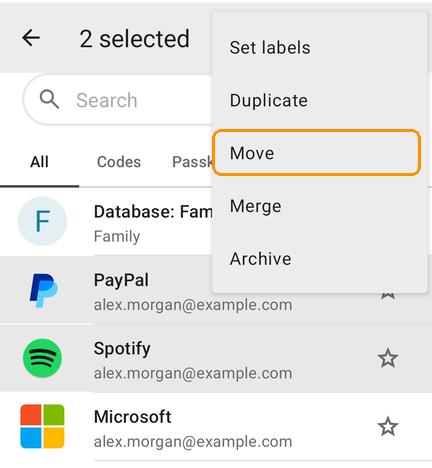
Move
- Open the database you want to move cards from
- Long-press any card to enter selection mode, then select the cards you want — or tap Select all at the top to grab everything at once
- Tap ⋮ → Move and choose the destination database in the Move To window
- Repeat if you have more databases to consolidate
Move removes cards from the source database and puts them in the trash. It only appears in the menu when you have more than one database.
How to merge on iOS
iOS does not support selecting multiple cards at once — cards must be moved one at a time.
- Open the database you want to move cards from
- Long-press any card
- Tap Move and choose the destination in Move To
- Repeat for each card you want to move
Move only appears when you have more than one database.