
Safe Share — Send a Card Securely
Safe Share sends a single card to another person as an encrypted link. The code that unlocks it travels separately, so intercepting one message on its own gives nothing away.
It works even if the person you're sending to doesn't have Safe yet — receiving and opening a shared card is free, with no signup and no purchase.
How to send a card
Open the card, tap the three-dot menu (⋮) → Share, and choose Share as encrypted link. Safe then walks you through two steps.
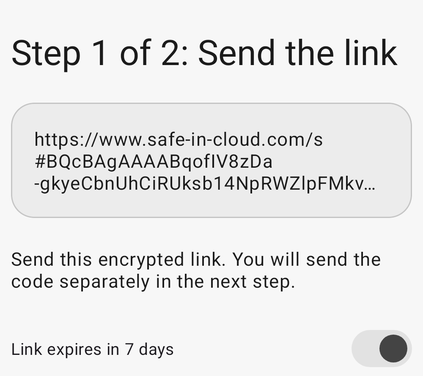
Step 1 sends the encrypted link
Step 1 — send the link. Safe shows the encrypted link and a Link expires in 7 days switch, on by default. Send the link however you normally chat, then tap I've sent the link.
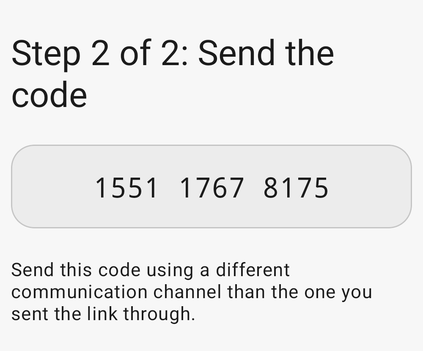
Step 2 sends the code separately
Step 2 — send the code. Safe shows a 12-digit code. Send it through a different channel than the link — another messenger, an SMS, or read it out loud.
What the recipient sees
With Safe installed, tapping the link opens the card straight in the app, which then asks for the code.
Without the app, the link opens safe-in-cloud.com/s instead:
- Android or iPhone — install Safe from the store, then go back to the chat and tap the link again. Opening the app from the store instead leaves the card behind.
- Computer — the page asks them to open the same link on their phone.
In a messenger's built-in browser (Telegram, WhatsApp) with the app already installed, the page shows an Open in app button that pulls them into Safe.
Why the code travels separately
The link carries the encrypted card; the code is the key that opens it. Split across two channels, an attacker has to compromise both to get anything — reading your chat history alone isn't enough.
The encrypted part sits after the # in the link, and browsers never send that part to any server. Not even to ours.
Sharing as plain text instead
The same Share menu also offers Share as plain text, which sends the card's contents through your device's standard share sheet with no encryption and no code.
Still need help?
Contact support@safe-in-cloud.com with your Safe version and a description of what you tried.