 Safe Knowledge Base
Setting Up Safe for Your Family
Family License is the easiest way to get Premium for everyone in the family — it's a pack of up to 6 licenses at a significant discount. Each person gets their own database, their own master password, and full Premium on all their devices.
Step 1: Purchase Family License
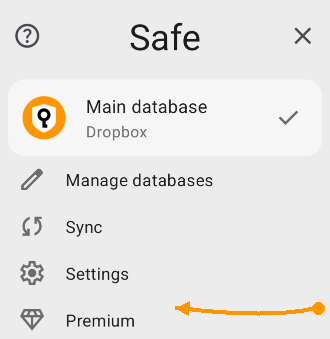
Go to Premium to purchase
The organizer (you) purchases Safe Family — either Lifetime or Annual. Open the app, tap the Safe button in the top-right corner of the app, and go to Premium → Premium Plans. You'll see the Family option there.
Step 2: Invite family members
Go to Premium → Family Management and add your family members by email. Each person will receive an invitation email with instructions.
Step 3: Everyone sets up Safe individually
Each family member installs Safe on their own phone, creates their own database with their own master password, and enters their email to activate Premium. After that, everyone should go through the usual first-time setup:
- Cloud sync — each person connects their own cloud account. How to set up
- Autofill — enable password suggestions in apps and websites. How to set up
- Import passwords — pull in existing passwords from browsers. How to import